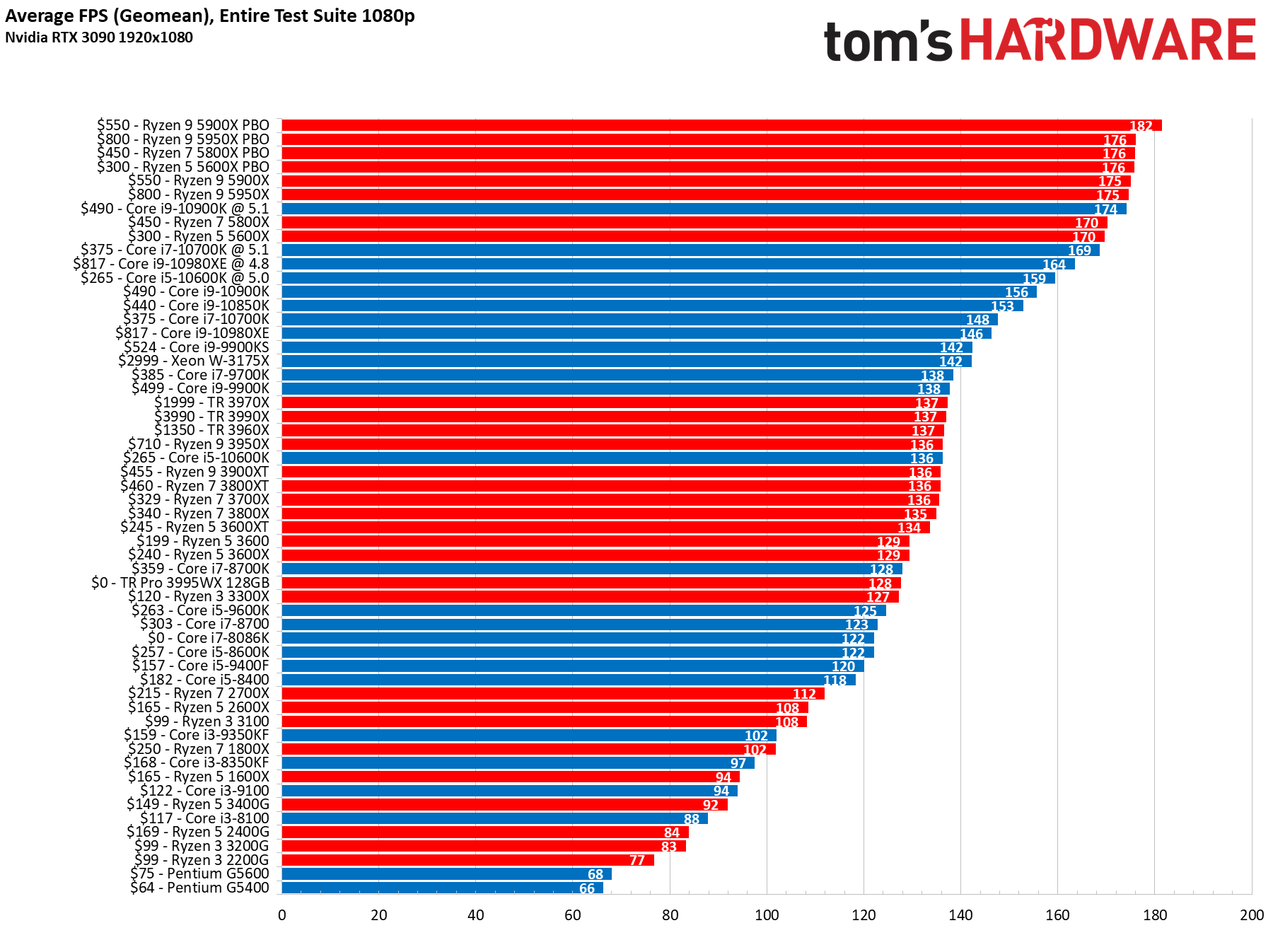
Processor Benchmark Comparison: Understanding CPU Performance Metrics
In the fast-evolving world of computing, choosing the right processor is crucial for optimal performance, whether for gaming, content creation, or everyday tasks. However, with a plethora of CPUs available from different manufacturers, each boasting unique specifications and features, making an informed decision can be challenging. This is where processor benchmarks come into play.
Processor benchmarks are standardized tests designed to assess the performance of CPUs under various workloads. They provide quantifiable metrics that allow users to compare different processors and gauge their suitability for specific tasks. This article delves into the world of processor benchmarks, exploring their importance, different types, key metrics, and how to interpret the results to make the right choice for your needs.
Why Processor Benchmarks Matter
- Objective Comparison: Benchmarks provide an objective and standardized way to compare the performance of different processors, eliminating subjective opinions and marketing hype.
- Performance Prediction: Benchmarks can help predict how a processor will perform in real-world scenarios, allowing you to choose a CPU that meets your specific performance requirements.
- Identifying Bottlenecks: Benchmarks can help identify potential bottlenecks in your system, such as a slow CPU hindering the performance of a powerful GPU.
- Overclocking Evaluation: Benchmarks can be used to evaluate the performance gains achieved through overclocking, helping you fine-tune your system for maximum performance.
- Value Assessment: By comparing the performance of different processors against their price, benchmarks can help you determine the best value for your money.
Types of Processor Benchmarks
Processor benchmarks can be broadly categorized into two types: synthetic benchmarks and real-world benchmarks.
-
Synthetic Benchmarks:
Synthetic benchmarks are designed to test specific aspects of a processor’s performance using artificial workloads. They are often used to isolate and measure the performance of individual components, such as the CPU cores, cache, and memory controller.
- Examples: Cinebench, Geekbench, 3DMark CPU tests, PassMark CPU Mark.
- Advantages: Consistent and repeatable results, easy to compare across different systems, can highlight specific strengths and weaknesses of a processor.
- Disadvantages: May not accurately reflect real-world performance, can be optimized by manufacturers to inflate scores.
-
Real-World Benchmarks:
Real-world benchmarks simulate actual tasks that users perform on their computers, such as gaming, video editing, and web browsing. They provide a more realistic assessment of a processor’s performance in everyday scenarios.
- Examples: Gaming benchmarks (using popular games), video encoding tests (using software like Handbrake), image editing tests (using software like Photoshop).
- Advantages: More accurately reflects real-world performance, provides a better understanding of how a processor will perform in specific applications.
- Disadvantages: Results can be influenced by other system components (GPU, RAM, storage), less consistent and repeatable than synthetic benchmarks.
Key Metrics in Processor Benchmarks
When evaluating processor benchmark results, several key metrics should be considered:
- Single-Core Performance: Measures the performance of a single CPU core. Important for tasks that are not heavily multithreaded, such as older games and some productivity applications.
- Multi-Core Performance: Measures the combined performance of all CPU cores. Important for tasks that can take advantage of multiple cores, such as video editing, 3D rendering, and modern games.
- Clock Speed: The rate at which the CPU executes instructions, measured in GHz. Higher clock speeds generally translate to better performance, but this is not always the case, as other factors like architecture and core count also play a significant role.
- IPC (Instructions Per Cycle): A measure of how many instructions a CPU can execute per clock cycle. Higher IPC indicates a more efficient architecture.
- Cache Size: The amount of high-speed memory available to the CPU. Larger cache sizes can improve performance by reducing the need to access slower system memory.
- Power Consumption (TDP): The amount of power a CPU consumes, measured in Watts. Lower TDP values indicate better energy efficiency.
- Thermals: The operating temperatures of the CPU under load. Lower temperatures can improve stability and prevent thermal throttling, which can reduce performance.
Interpreting Benchmark Results
Interpreting benchmark results requires careful consideration of the specific tasks you intend to perform. Here are some general guidelines:
- Identify Your Needs: Determine the primary tasks you will be performing on your computer. Are you a gamer, content creator, or general user?
- Focus on Relevant Benchmarks: Choose benchmarks that are relevant to your specific needs. For example, if you are a gamer, focus on gaming benchmarks. If you are a video editor, focus on video encoding benchmarks.
- Compare Against Similar Processors: Compare the benchmark results of the processor you are considering against similar processors in the same price range.
- Consider the Overall System: Remember that processor performance is only one factor in overall system performance. Other components, such as the GPU, RAM, and storage, can also have a significant impact.
- Read Reviews: Read reviews from reputable sources to get a more comprehensive understanding of a processor’s performance.
Popular Benchmarking Tools
Here are some popular benchmarking tools used for evaluating CPU performance:
- Cinebench: A popular benchmark that measures CPU performance using the Cinema 4D rendering engine.
- Geekbench: A cross-platform benchmark that measures both single-core and multi-core performance.
- 3DMark: A suite of benchmarks that includes CPU tests for gaming performance.
- PassMark CPU Mark: A comprehensive benchmark that tests various aspects of CPU performance.
- Handbrake: A video encoding tool that can be used to benchmark CPU performance in video editing tasks.
- Blender: A 3D creation suite used for benchmarking CPU rendering performance.
Conclusion
Processor benchmarks are essential tools for evaluating CPU performance and making informed purchasing decisions. By understanding the different types of benchmarks, key metrics, and how to interpret the results, you can choose a processor that meets your specific needs and budget. Remember to consider the overall system and read reviews from reputable sources to get a complete picture of a processor’s performance. As technology advances, keeping up with the latest benchmarks is crucial for staying informed and making the best choices for your computing needs.